
Note
As of version 2.0.340.0 dated 02.04.2025, the folder structure in OXARI has changed.
Therefore, please update the paths and remove the publinux folder from the path in the OXARI service files - OxariAPI.service and OxariConsole.service and reset these services.
The service files can be found in /etc/systemd/system/.
-
Before performing the upgrade, it is best to stop both OXARI services on the server:
a) sudo systemctl stop OxariAPI.service
b) sudo systemctl stop OxariConsole.service
-
Copy the .pfx certificate from the location:
a) home/<name>/Oxari/Console/_SupportFilesor
b) etc/Oxari/Console/_SupportFilesor
c ) opt/Oxari/Console /_SupportFiles
to another location
-
Then delete the contents of the folders from the locations:
a) home/<accountname>/Oxari/API/
b) home/<accountname>/Oxari/Console/
or
c) etc/Oxari/API
d) etc/Oxari/Console
or
e) opt/ Oxari/API
f) opt/Oxari/Console
-
Download new files:
a) sudo wget file.it-man.pl/dev/Oxari.Web.API.zip
b) sudo wget file.it-man.pl/dev/Oxari.Web.Console.zip -
Extract to location:
a) sudo unzip Oxari.Web.API.zip -d home/<account names>/Oxari/API
b) sudo unzip Oxari.Web.Console.zip -d home/<account names>/Oxari/Console
or:
c) sudo unzip Oxari.Web.API.zip -d etc/Oxari/API
d) sudo unzip Oxari.Web.Console.zip -d etc/Oxari/Console
or
e) sudo unzip Oxari.Web.API.zip -d opt/Oxari/API
f) sudo unzip Oxari.Web.Console.zip -d opt/Oxari/Console
-
Then move the .pfx certificate to the location:
a) home/<name>/Oxari/Console/_SupportFiles
b) etc/Oxari/Console /_SupportFiles
c) opt/Oxari/Console /_SupportFiles
-
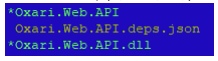
Then assign permissions to OXARI files:
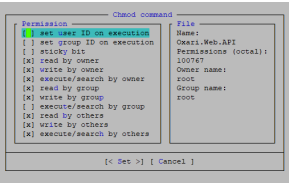
a) Oxari.Web.Console (home/<name>/Oxari/Console)
or
b) Oxari.Web.Console (etc/Oxari/Console)
or
c) Oxari.Web.Console (opt/Oxari/Console)

d) Oxari.Web.API (home/<name>/Oxari/API)
or
e) Oxari.Web.API (etc/Oxari/API)
or
f) Oxari.Web.API (opt/Oxari/API)
-
Finally, start the services:
a) sudo systemctl start OxariAPI.service
b) sudo systemctl start OxariConsole.service